Friday, February 6, 2015

Answer: Who else is in that family tree...?


The family tree of Jesse in a Chartres window


Sometimes you're lucky ... 

and you just know what to search for--other times, it's not quite as obvious.  This week's Challenge was a little of both.  

Our questions for this week begin with the extended family of the co-discovers of the piezoelectric effect.

Getting started isn't hard: 

     [ piezoelectric effect discover ] 

(Or even just a simple [ piezoelectric effect history ]).  With either query, we quickly find out that this side effect (aka "pyroelectricity") of twisting or hitting certain crystals was first noted by Pierre and Jacques Curie in 1880 and reported by them in the Bulletin of the Mineralogical Society of France.  

1.  Who ELSE in the Curie family worked in the sciences?  What areas are they best known for?  (And, for extra credit, who in this extended family had an affair with his PhD thesis advisor's wife? Just to keep things interesting, her granddaughter and his grandson were married years later.)  Can you draw a diagram to keep track of who's-who in this remarkable family? 
 As you know, Marie Curie (aka Marie Skłodowska Curie) and Pierre gained fame with their work on radioactivity and radioactive elements in particular.  (Such as radium and polonium.)  Recognizing in each other an intellectual and soul mate, they married in 1895, and together they turned out a remarkable body of research in chemistry and physics, leading to their Nobel prizes, the Davy Medal and so on.  

They were also the centerpiece of this remarkable family of incredibly accomplished people. 

When I started tracking down the cousins, uncles, and granddaughters, I realized that someone else had probably done this already.  So my next query was for: 

     [ Marie Curie family tree ] 

And it's not hard to find a bunch of them by doing an image search.  

Here's one from ektalks.blogspot.com, which also features several other family trees of prestigious scientists (such as the James Clerk Maxwell family, the Alexander Graham Bell family, etc.)  

Curie family tree. By Ravi Singhal.

As you can see, Pierre and Jacques were brothers, both accomplished mineralogists and physicists.  Pierre married Marie, and they had two children, Irene and Eve.  

Marie with her daughters, Irene and Eve. (1908)
from: Dorset Life
Irene was quite a researcher herself, initially helping her mother, Marie, run x-ray units in the field during World War I, and then developing lab techniques for radiochemical research.  She also married smart, joining research forces with Frederic Joliot.  They then did significant research together and made major discoveries in chemistry and physics (e.g., creating radioactive nitrogen from boron--the transmutation of elements, the alchemists dream!).   

(Interestingly, Irene's PhD thesis advisor in physics was Paul Langevin. Paul's thesis advisor, in turn, was her father, Pierre Curie.   Remember Paul, he'll return in another role. )

Irene and Ferederic won a Nobel prize (chemistry) in 1935, while mother Marie won a joint Nobel prize with Pierre in 1903 (physics), and again, solo,  in chemistry (1911).  

Eve Curie, the youngest daughter of Pierre and Marie was a writer and pianist.  Her father, Pierre, was tragically killed when she was just 2 (run over by a horse cart), and she ultimately wrote a quite popular biography of her mother, Madame Curie, which won the third annual National Book Award for non-fiction.  The book was turned into a movie, with Greer Garson in the title role (and an uncredited Aldous Huxley as the screenwriter!).  

We have a couple other questions:  "Who had an affair with his PhD thesis advisor's wife?"  

Here, I liked Ramon's query:  

     [ Curie affair ]  

The Excelsior news of France,
with Marie Curie on the cover.  Scandal!
Following up on all of the pages this returns is a great way to spend an afternoon.  Not only do you discover that yes, Marie and Paul Langevin had a fairly torrid affair, but that it was splashed all over the front pages of scandal-driven newspapers of the time.  Even Einstein wrote to Marie telling her to ignore the trolls in the press about the affair.  

(I wish I could go into all the details of Marie Curie's life--but let me assure you, if you're looking for evidence that scientists can be as earthy and sexy as any pop star, check out any of the biographies of Marie Curie's life.  What a woman!)  

And of course, I learned by reading the biography of Paul Langevin that their Paul's grandson (Michel Langevin) and Marie's granddaughter (Hélène Langevin-Joliot) married to one another.  

Hélène is currently a professor of nuclear physics at the Institute of Nuclear Physics at the University of Paris and a Director of Research at the CNRS), while Michel Langevin used to work there as well.  


2.  It turns out that remarkable families seem to center on a particular theme or domain of interest.  The Bach family (for instance, Johann Sebastian, Carl Phillip Emmanuel, Johann Christoph Friedrich, etc etc) were synonymous with music from 1600 until 1800.  Can you find another remarkable family with 8 or more members who distinguished themselves in math?  (Or, if you prefer, some other area...)  

I liked Hans solution for this: 

     [ famous family mathematicians ] 

When I did this initially, I did the query:  [ family mathematics ] but was reminded that "family" is a technical term in mathematics, and has nothing whatsoever to do with people and family relationships.  So adding in the term "famous" is a great solution. 

As many Regular Readers pointed out, the Bernoulli family is an outstanding example of mathematicians and physicists that's impressive in its scope.  The Wikipedia article on the Bernoulli family is pretty amazing, listing 11 family members who made major contributions--including the Bernoulli differential equation, the Bernoulli distribution, and Bernoulli effect (for air moving through tubes of different sizes).  

Other Readers pointed out the Huxleys (a British family of which several members have excelled in scientific, medical, artistic, and literary fields), and the extended Darwin clan (two interrelated English families, descended from the prominent 18th-century doctor, Erasmus Darwin, and Josiah Wedgwood; the family includes Charles Darwin, at least ten Fellows of the Royal Society and several artists and poets).  


Search Lessons: 

This wasn't a difficult Challenge, but it was fun.  Who knew there could be such wonderful histories! 

For searching, this was largely about choosing the right terms, getting started, and then taking notes as you read along the way.  

1.  Use Images when searching for an inherently visual thing.  For instance, when I was looking for a family tree--Google Images took me right to a bunch of great examples of the Curie family tree.  

2.  Remember that you'll sometimes stumble across words that have unexpected technical meanings.  As I found in the above "family mathematicians" example, "family" has a meaning I hadn't expected, so I had to add in "famous" to limit the results to just those that are about famous, human families.  


Search on! 


Wednesday, February 4, 2015

Search challenge (2/4/15): Who else is in that family tree?

Family tree of Jesse. Chartres cathedral.
Sometimes you're lucky ...
and you're born into a family that has connections, lives in an interesting place.  Or perhaps you're born into a family has a few remarkable family members.  


Today's Search Challenge investigates one such family tree.  Your first challenge is to investigate the family of the brothers who first showed the existence of the piezoelectric effect. That's the physical effect behind many gas lighters installed on backyard barbecue grills, the quartz beating heart of many watches, and radar transponders.  Basically, when you squeeze certain crystals, they produce electricity that can be turned into sparks, or very slight mechanical movements that happen very precisely (as is the case for watches).  

It turns out that these brothers were part of a large, VERY interesting family that includes a number of Nobel prize winners. In fact, a remarkable number of Nobel prize winners.  

Today's questions are simple (#1), and slightly more complicated (#2). 

Caution:  You can easily spend hours and hours having fun with this.  I spent waaay too much time investigating the family tree.  This is a great jumping off point for hours of reading and investigation.  

1.  Who ELSE in the family worked in the sciences?  What areas are they best known for?  (And, for extra credit, who in this extended family had an affair with his PhD thesis advisor's wife? Just to keep things interesting, her granddaughter and his grandson were married years later.)  Can you draw a diagram to keep track of who's-who in this remarkable family? 
2.  It turns out that remarkable families seem to center on a particular theme or domain of interest.  The Bach family (for instance, Johann Sebastian, Carl Phillip Emmanuel, Johann Christoph Friedrich, etc etc) were synonymous with music from 1600 until 1800.  Can you find another remarkable family with 8 or more members who distinguished themselves in math?  (Or, if you prefer, some other area...)  

When you find your answer, be sure to tell us HOW you found the answer and post it into the comment thread.  What led you from clue-to-clue?  What questions did you ask yourself, and how did you answer them? 

(Note that we're all interested in what you really did, not what you think you should be doing.  If you asked someone, that's totally fine--just tell us!)  

Search on! 


Friday, January 30, 2015

Answer: Mapping the discovery of the sea cow and the blue jay

Steller's Jay.  Image from Bill Walker. 

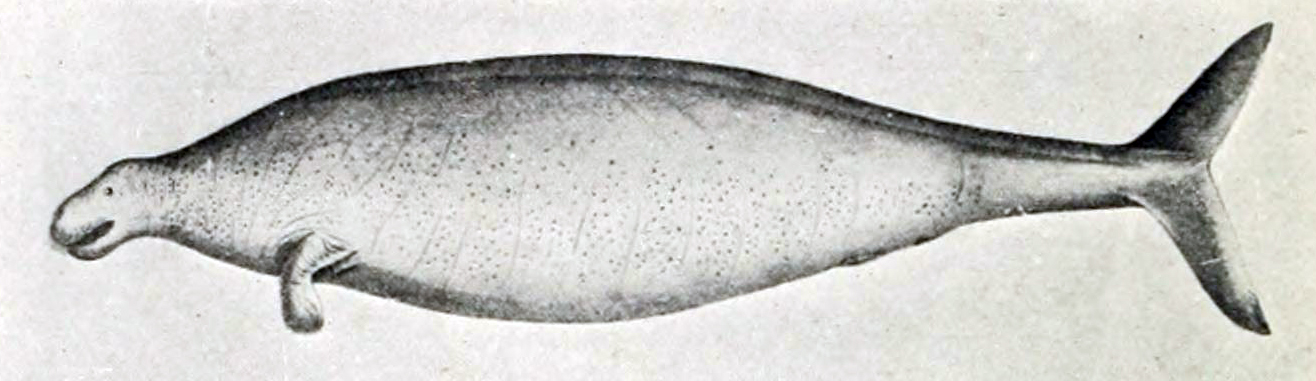
Steller's sea cow (Hydrodamalus gigas).  Drawing by Georg Steller.  Image from Wikimedia.
This week's Challenge was to determine


1.  Are these two animals (the Steller's sea cow and the Steller's jay) named for the same person?  If so, who?  Whatever became of Steller?  
2.  I imagine that these animals were both discovered during an exploratory voyage of some kind.  Can you find out the name and organizer of the voyage that found both the Sea Cow and the jay?   
3.  Can you make a Google Map that shows the voyage of discovery wherein both a sea cow and a blue jay were found?  Ideally, your map would show the path the explorers took and have a couple of markers showing where both the sea cow and jay were discovered (as well as any other discoveries that might be significant).  


1. and 2.  Sea cow AND  jay named for the same person? Found on a voyage?  A:  Yes!  Two quick searches show us that they're both named for Georg Steller.  Wikipedia tells us that he was "Georg Wilhelm Steller (10 March 1709 – 14 November 1746), a German botanist, zoologist, physician and explorer, who worked in Russia and is considered a pioneer of Alaskan natural history."   He gave his name not just to the Steller's sea cow, but also Steller's sea eagle, Steller's jay, Steller's sea lion, and Steller's eider (smallish sea duck that breeds along the Arctic coasts of eastern Siberia and Alaska).  


Steller's eider.  Image from Wikimedia.

Steller's sea eagle.  Image from Wikimedia. 

Steller's sea lion.  Image from Wikimedia.  

Steller traveled to Russia as a physician arriving in November 1734. He met the naturalist Daniel Gottlieb Messerschmidt at the Imperial Academy of Sciences. Two years after Messerschmidt's death, Steller married his widow and learned from his unpublished notes about Vitus Bering’s Second Kamchatka Expedition.  Unfortunately, it had already left Saint Petersburg in February 1733. He volunteered to join the research expeidition and in January 1738 left to catch up with the group's planned exploration of the Kamchatka peninsula. He finally caught up with the main expedition in March 1740. 

Bering summoned Steller to join the voyage to the east in search of America and the strait between the two continents, serving in the role of scientist and physician.  The expedition's two ships became separated, and Bering's ship continued to sail east, expecting to make American landfall soon. Steller, reading sea currents and flotsam and wildlife, insisted they should sail northeast, making landfall in Alaska at Kayak Island in July 1741. Bering wanted to stay only long enough to take on fresh water. Steller argued Captain Bering into giving him more time for land exploration and was granted 10 hours. During this time, as the first non-native to have set foot upon Alaskan soil, Steller became the first European naturalist to describe a number of North American plants and animals, including a jay that became known as Steller's jay.  The first scientific description of the sea otter is contained in the field notes of Steller from 1751.

The sea cow described by (and named for) Steller lasted barely 25 years after it was discovered, a victim of over-hunting by the Russian sailing crews that followed in Bering's wake. In Steller's brief encounter with the bird, he was able to conclude that the jay was a cousin to the American blue jay, a fact which seemed suggested strongly that Alaska was indeed part of North America.


The expedition was a hard one, with many of the crew suffering from scurvy.  Although Steller tried to treat the crew's scurvy with leaves and berries he had gathered, officers declined his proposal. As a results, Steller and his assistant were some of the very few who did not suffer from the ailment. On the return journey, with only 12 members of the crew able to move and the rigging rapidly failing, the expedition was shipwrecked on what later became known as Bering Island. Almost half of the crew had perished from scurvy during the voyage. Steller nursed the survivors, including Bering, but the aging captain couldn't be saved and died from a deficiency of Vitamin C.


On the return trip, Steller came down with an unknown fever, and died in Tyumen, Siberia, trying to get back to St. Petersburg.  

3.  Can you make a map of the expedition?  

By reading this history of Steller and Captain Bering, it gives us an important clue: The name of the expedition.   It's not Steller's expedition--it's Bering's!

So I did a query for: 

     [ map Bering's expedition ] 

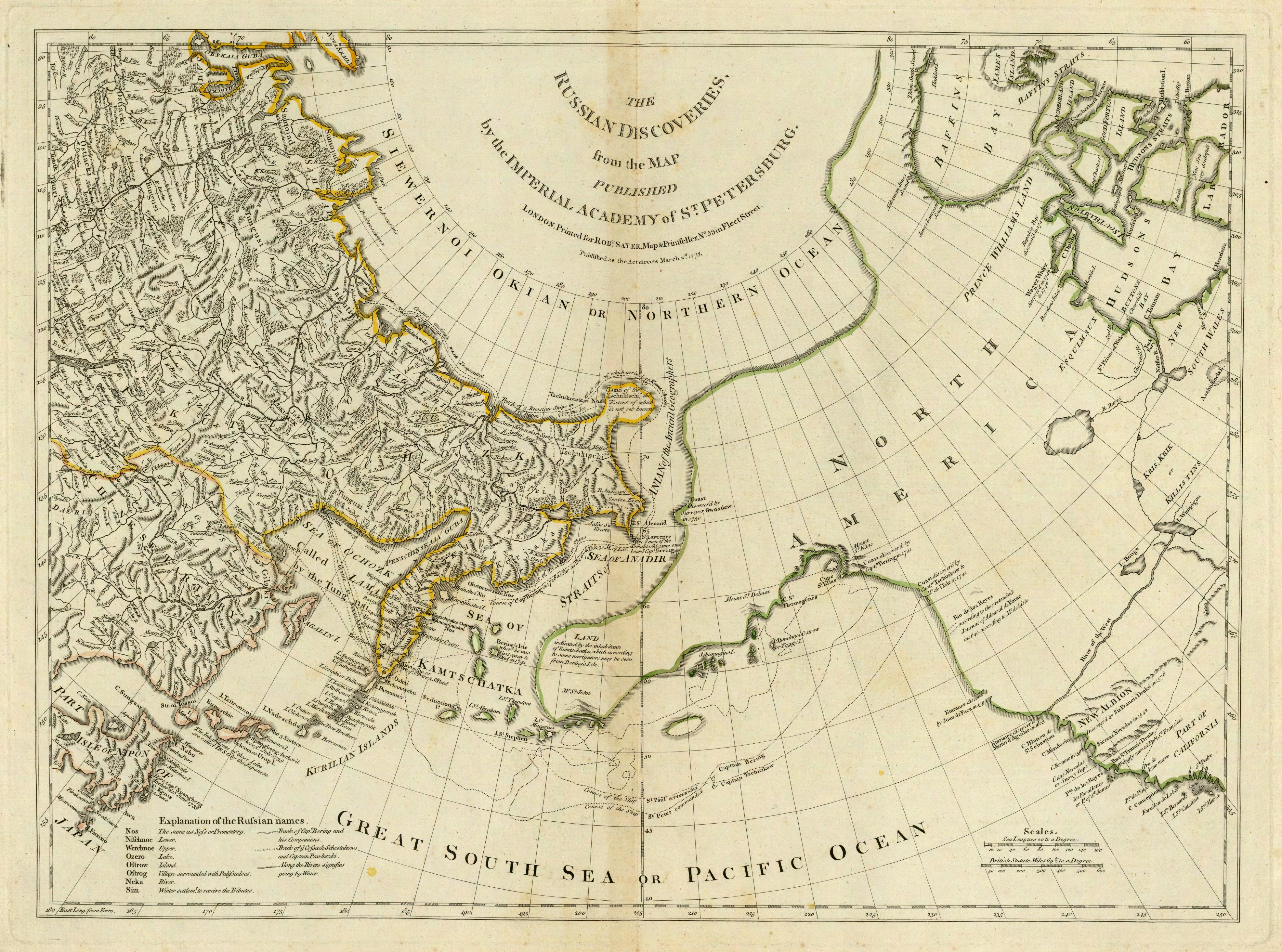
and found this lovely map of the entire expedition on the Wikipedia article.  (This is an excerpt of the entire 18th century map which is worth examining.  It is entitled The Russian Discoveries prepared by the London cartographer Thomas Jefferys. This is a reprint published by Robert Sayer in the American Atlas of 1776). 


I ALSO found an already existing map done in Google Maps:  Check out George Stiller's Map of Vitus Bering's Fatal Expedition of 1734.  Many of the icons are clickable and will give you more information about what happened at that spot during the expedition.  

AND Rosemary did this wonderful version of the map that she's given me permission to embed here.   (Be sure to click on the Anchor symbols for nice tidbits about the expedition.)  


I still wanted to find a high resolution map of the expedition, so I did another query:

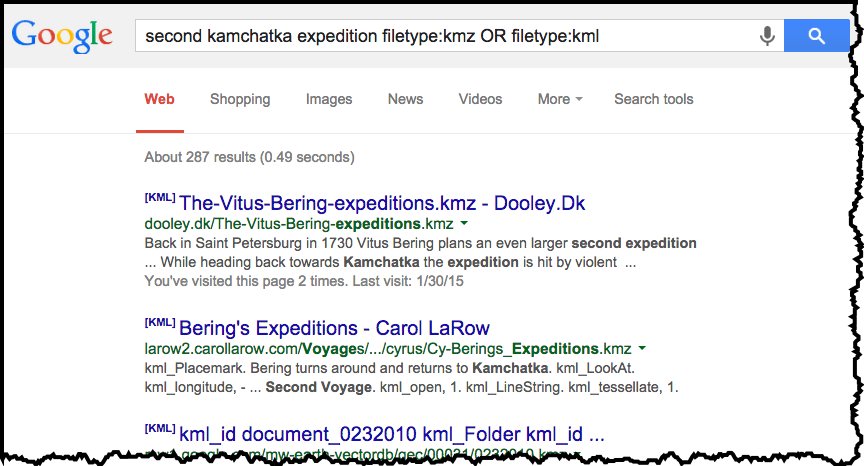
     [ second kamchatka expedition filetype:kmz OR filetype:kml  ] 

here I'm using the more-or-less official name (in English) for the voyage, and I've added two filetype filters.  A KMZ file or a KML file are files for Google Earth.  I found a couple of them, downloaded them both, and opened them in Google Earth.   (The one I highlight here was created by Tom Kjeldsen in May, 2012.)


As you can see, this map fairly closely follows the The Russian Discoveries map shown above.

You can upload the Russian Discoveries map as a Google Earth overlay, and (within my limits of doing alignment), get something like this:


Or, you could export this to a KML file, and then upload this to your Google Maps:


This isn't a perfect answer to the problem, but there's a lot of good stuff here.  

Search lessons: 

1.  There are maps out there--search first!  

2.  Be sure to remember that Google Earth can import KMZ files and export KML files... which you can then IMPORT into My Maps to create a base layer of placemarks to make the map you really want. 


That's kind of a lot for such a "small" problem, but what a lot of fun!  

Thanks to all of the expert SearchResearchers out there.  (And  a special thanks to Rosemary for sharing her work.)  

Search on! 


Wednesday, January 28, 2015

Search Challenge (1/28/15): Mapping the discovery of the sea cow and the jay


When I write these Search Challenges....
 I find that they mostly arise from questions that people ask me ("What's that wreck in the water?"), or interesting tidbits that I run across in my non-working life that intrigue me. 


The sadly extinct Steller's sea cow. Image from Wikimedia

One such intriguing tidbit I discovered recently is the Steller's sea cow, a large sirenian mammal that's now extinct.  I'd read something about that and wondered if it was somehow connected with the Steller's jay--a common jay in the forests near where I live.   


A non-extinct Steller's Jay.  Photo by Bill Walker

Could it be that these two very different animals are both named for the same person?  

Today's Challenge, like all good Challenges, comes in three parts. 


1.  Are these two animals named for the same person?  If so, who?  Whatever became of Steller?  
2.  I imagine that these animals were both discovered during an exploratory voyage of some kind.  Can you find out the name and organizer of the voyage that found both the Sea Cow and the jay?  
3.  Can you make a Google Map that shows the voyage of discovery wherein both a sea cow and a blue jay were found?  Ideally, your map would show the path the explorers took and have a couple of markers showing where both the sea cow and jay were discovered (as well as any other discoveries that might be significant).  

As an example, here's a map showing a portion of the Voyage of the Beagle, Charles Darwin's famous trip around the world that gave him so much data and profoundly influenced his work on evolution.  


From Google Maps Gallery


This is a fun challenge full of great surprises.  (Or at least I learned a great deal of fascinating natural and social history in the process.)  It's not difficult, just really, really interesting.  

Search on! 

Friday, January 23, 2015

A quick reflection on the "Where's the lake...?" Challenge

I don't know about you, but in the history of SearchResearch, the "Where's the lake...?" Challenge was probably the toughest Challenge to date.

But it actually wasn't quite what I thought would happen!  I had 3 big surprises in this Challenge.  

1.  SearchResearchers fairly quickly agreed on using Fusion Tables as the main tool for pulling all the data together.  In the discussion group (which was quite active, and very fun to read), the consensus came up fairly quickly. That makes sense, and it's the way I wrote my solution, to follow along in what everyone was doing.    

What I thought was going to happen was that you'd create a mySQL database in the cloud, load up the data, then run your query in that!  

In other words, I tried to write the Challenge so that a "regular" database was needed.  I didn't think that Fusion Tables would be a good solution--but I was wrong.  Obviously, it's quite possible to search a Fusion Table for "All lakes above 8000 feet that have been planted with trout in Northern California."  It was just a matter of applying filters to the data table once it was created by fusing different pieces together. 

I didn't expect that.  But it's a great solution.  Nicely done, team.  


2.  The second thing I didn't expect was that there wouldn't BE ANY lakes that fit all of the criteria.  What do you know?!   (I mean, I knew there were a lot of lakes way high in the California Sierras, and I know that many of them were planted, and when I scanned the list I thought I saw some that I thought fit the bill.  Turns out I misread the dataset when I was creating the problem!) 

As I wrote in the previous blog post, that's part of the reason that you want to use complete data sets (and them put them into Fusion Tables or mySQL so you can query those tools).  This is exactly the kind of thing that search engines are NOT very good at--the very fine grain analysis of data.  A search engine can help you find the data, but then you have to process it a bit yourself, with your own tools.  Metaphorically speaking, the search engine can find you the cow, but you have to make your own sausage.  


3.  I didn't expect all of the back-and-forth steps during my solution.  I realize that my writeup (in three parts) was long and complicated, but I hope you took away one lasting lesson from this:  Even experts have to do a lot of iteration to get the data right.  

In effect, a lot of what I wrote down were all of the "I forgot to include this, let me back up and do it again with this new data" steps.  Normally in classes, the teachers don't show you these steps because they're slightly boring and show what an idiot you are.  (Remember doing proofs in your high school math class?  I realized after a while that nobody really does proofs like that.  Real mathematicians take a lot of forward-and-back steps to figure it out. Everyone goofs.)  

But when I wrote up my solution, I wanted to document all of those intermediate steps as well.  Real data scientists do this all the time, which is why I wanted to write it down, to show you the inner steps that I wish my teachers would have shown me.  

Overall this was a toughie, no doubt about it.  But I hope the search lessons are clear.  If I was to summarize them, I'd say: 

A.  Keep track of your data sources; keep your metadata with the data.  With all of the updates and recasting of the data, it was essential to know where a particular set of data originated.  Keep track of that stuff!  (In FT it's easy--there's a spot for it in the header.  In Spreadsheets, I always add a comment to cell A1 with the metadata.)  
B.  When something takes multiple days to solve, leave yourself a note at the end of the day so you know what you're doing and what's next.  That's why I summarized what the key questions were in each of my posts.  That's basically what I wrote down to keep track of the whole process.  
C.  Check your data.  Check your data.  Check your data.  As you saw, a couple of times I found errors in transcription, or data getting clobbered by accident. (Such as when the lat/longs on Horseshoe Lake were wrong.)  I like to try to view the data in a different way--such as plotting the locations on a map--to see what I can spot.  Spreadsheet computations are often a source of error, so constantly check to make sure that each time you touch the data, you're not accidentally messing it up.  
D.  Keep trying.  This was really a multiple step problem.  Sometimes you just have to stick with it.  

Thanks again to everyone for sticking with the problem.  It was great to see everyone pitching in and contributing.  

Search on! 


Wednesday, January 21, 2015

Answer: Where's the lake... (Part 3 of 3)


I realize that this is a kind of long process, but stick with me until the end.  It's got a twist ending.  

A quick recap of what we've done over the past couple of days... 


 Post #1 we started to figure out everything that's needed.  Here's what we did:  

1. Find a list of lakes in CA.  Find the USGS GNIS system, and use it to...  
2. Download the GNIS list of lakes, import into a Fusion Table (“Lakes in CA”), convert their LAT, LONG into decimal lat/long. 
3. Find a list of the stocked lakes in CA.  Find the CDFW list. 
4. Download the CDFW list of stocked lakes into a spreadsheet (“Fish planting”) 
5. Merge the “Fishplanting” table with “Lakes in CA” to make “Merge of Lakes…” FT 
6. Check the data.  Create a map of all the Horseshoe Lakes.  Notice that the Horseshoe Lakes are all in the wrong places.  Why?  Make a plan for the next post... 


Post #2 we've got errors--we need to fix them up and find the answer.  

7. Work backwards to discover that the lat/long conversion in step 2 was wrong.  Fix that up and re-merge the tables together. 
8. Map the Horseshoe Lakes again, and check that they’re correct.  (They are now.) 
9. Check ALL of the Horseshoe Lakes in the table and find that the one in Alameda county is missing—why? 
10.  Discover that it’s actually a reservoir, and not in the master list of lakes from GNIS (step 2). 
11.  Go back to GNIS and import a list of all the reservoirs in CA, and re-merge that table into the master list of “CA lakes and reservoirs with extracted lat/longs”  and re-merge everything together. 
12. Now, in the newly re-merged table, notice that all of the Horseshoe Lakes have the same lat/long.  Now what?  Why is this happening?  
13. By looking over the data tables, find that there’s only one Horseshoe Lake that has been planted, the one in Alameda county.  Figure out that the fusing step overwrites ALL of the lakes names “Horseshoe Lake” with the same lat/long value because the lake names are not unique.
 
That gets us up to today’s post.   

Post #3 in which we solve those last problems and find the answer! 

Here's a sketch of what we need to do today.  

Step A. Create the unique IDs by fixing up the table to have a new column of Lake+County name. 

Step B. Re-fuse the tables together to make a new, correct table.

Step C. Filter to see the lakes that have been planted, and in Northern California, AND above 8,000 feet in elevation. 

Step D.  Figure out the surface area of the lakes, and find the lakes that are > 500 acres, above 8,000 feet, AND have been stocked with fish in 2014. 


Step A.  Fix up FT to have Lake+County IDs. 

First, I opened the original spreadsheet for the "Fish Planting" (because you can’t manipulate columns easily in a Fusion Table).  Then, in that spreadsheet I... 

- added a new column (G) called “LakeCounty” which is column C (“Lake name”) concatenated with column B (“County”).   This gives us a new column "LakeCounty" which is unique, and will let us fuse the tables together.  It looks like this: 


Check out the new column on the far right.  That will come in handy in a bit.  

I'll want to fuse this with the fish plantings FT in a minute, but first I need to convert this spreadsheet into a FT first.  Create a NEW FT “Fish Planting Schedule 3” with the newly updated “Fish Planting” spreadsheet.

Now I need to go back to the “CA lakes with extracted lat/longs” spreadsheet  and add a new column (T) that is called “LakeCounty” which is column A (“Lake name”) and concatenate it with column D (“County”).   This will give us a key (that is, the column “LakeCounty”) over which we can fuse our data sets. 

Now, create a new FT from that spreadsheet, and give it the same name “CA lakes with extracted lat/longs”  (There's no confusion here because the first one is a spreadsheet, while this one is a Fusion Table (FT).  


Step B.  Fuse the tables together.  We need to fuse these two FTs -- “Fish planting schedule 3” with the “CA lakes with extracted lat/longs”.  This will give us the planted lakes fused on the key “LakeCounty.” 


With me so far?  This table looks like this: 

Note that I've hidden a lot of the extra columns that we don't care about.


NOW we’ve got the Fusion Table we want.  It’s got unique IDs for each lake (“LakeCounty”), along with the correct lat/long, the elevation, and the fish-planting date.  The blank rows on the right (where the yellow marks are) are lakes that were never planted.  Those columns ("Announce Date" etc) all come from the Fish Planting data that was fused with the lakes table.)  

First we look for the lakes/reservoirs in Northern California.  To play it safe, let’s filter on all lakes above latitude 39.0 (that’s roughly the centerline of California).  Click on the Filter button, and let's look at lakes between 39 degrees and 90 degrees of latitude.  (Remember that the correctly extracted latitude is in column LAT1.)  

Then sort by elevation (“Ele(ft)”) and we see this list sorted by elevation.  (Note that I’ve hidden many of the columns that aren’t useful to us now.  Here we see only the relevant columns.) 


Step C.  Filter to see the planted lakes.  And now, in the next-to-last step, we can filter by which lakes have been planted.  Just add a new filter (by clicking on the blue Filter button) and add a filter by FishType = ‘trout’


WHAT?  

There ARE no lakes that have been planted with fish in California that are above 8,000 feet in elevation!

As you can see, there are only 2 planted lakes in northern California, and only 1 of them is even reasonably high (Lake Almanor, at 4505 feet). 

Step D.  Check on the sizes of the lakes.  

Let’s check to see how big these lakes are. 

A quick search for [ Lake Almanor ] tells us that it’s 43.75 sq miles (113.3 km²), or well over 500 acres.  Likewise, a search for [ Baum Lake surface area ] tells us that it’s only 89 acres in size.  It’s nowhere near 500 acres we were looking for.  (And a quick look on the map reveals it’s long and skinny—not a biggish lake at all.) 

So... after all this analysis, we find that Little Rob and Big Jim probably don't actually need the Acetazolamide pills.  (I'm sure you did a search on Acetazolamide and found that it's a commonly used prescription drug for high altitude sickness.)  

But they're clearly headed for the largest, highest lake that's been planted with trout... and that's probably Lake Almanor in Plumas county.  

Map of Northern California showing Lake Almanor between Lassen and Tahoe National Forests

 Search Lessons:  

There are a LOT of lessons here, and I'll discuss some of them in more detail tomorrow.  

But the two biggest lessons are the ones I hope you take away, even if you didn't go through all of the Fusion Table details.  

1.  Sometimes the results aren't quite what you thought.  In this case, because we took the "download all the data and analyze it" approach, we were able to show pretty conclusively that there ARE NO lakes over 8000 feet that are planted with fish.  Just doing a set of queries for this kind of Challenge just doesn't cut it.  This is definitely one of the hardest things to find--a negative result.  But we were able to do it, even if (especially if) the result isn't what you expected. 

2.  Complex search is often a multi-step process.  As you saw, I took a lot of back-and-forth steps along the way, making one table, and then having to go back and modify it to include more information (e.g., adding a unique ID for lake names).  This was a slightly more involved search than usual, but it's not that uncommon a process for sensemaking and data science.  Welcome to data wrangling 101!  

And... to top it all off, while this solution works just fine, it wasn't what I thought you'd do!  (I'm showing you the Fusion Table solution, but there's another way to solve the problem that involves building a database... but we'll tackle that in another month or so.)  

Tomorrow... Reflections on the thought process to solve this Challenge, and my comments on the Discussion group for this problem

Searching on!